-
Address: Howay Tech Building, No.2 South 8th Keji Road, Hi-tech Park, Nanshan, Shenzhen
-
Email: chris@chinaledscreens.com
-
Website: https://chinaledscreens.com
LED Mesh Curtains for Stage Backdrops: A Professional Buyer & Engineering Guide 2026

LED Mesh Curtains for Stage Backdrops: A Professional Buyer & Engineering Guide
If you’re designing a stage backdrop for a concert, festival, theatre, or brand event, you usually have three competing goals:
- Big visual impact (it must read from the audience)
- Fast deployment (touring schedules don’t forgive slow builds)
- Real-world survivability (wind, rigging limits, camera requirements)
That’s exactly why LED mesh “curtain” displays exist. They deliver large-format visuals with a structure that is lighter, more breathable, and often more forgiving outdoors than a solid video wall—while still looking like a “real LED screen” to the audience.
This guide explains what an LED mesh curtain is, how to spec one correctly, and how to avoid the typical surprises (camera flicker, moiré, low contrast, wind problems). Along the way, you’ll find a copy-paste RFQ checklist you can send to suppliers.
For product overviews and references, you can also browse ChinaLEDScreens.
Table of Contents
What is an LED mesh curtain for stage backdrops?
An LED mesh curtain (also called an LED video curtain or flexible mesh screen) is a display format that leaves open space between pixels and/or structural members, creating a “see-through” LED surface. It’s commonly built as:
- Mesh cabinets/panels (rigid frames with open structure)
- Strip/ladder structures (LED bars with spacing)
- Curtain-style modular tiles that hang and scale quickly
Because it’s not a solid wall, it can offer big practical advantages on stage:
- Lower weight per square meter → easier to rig on truss and faster to fly
- Airflow → less wind resistance for outdoor stages
- Partial transparency → scenic looks, layered depth, lighting beams passing through
- Modularity → quick repair and scalable stage widths/heights
If you want a broader product snapshot, see Mesh LED Displays.
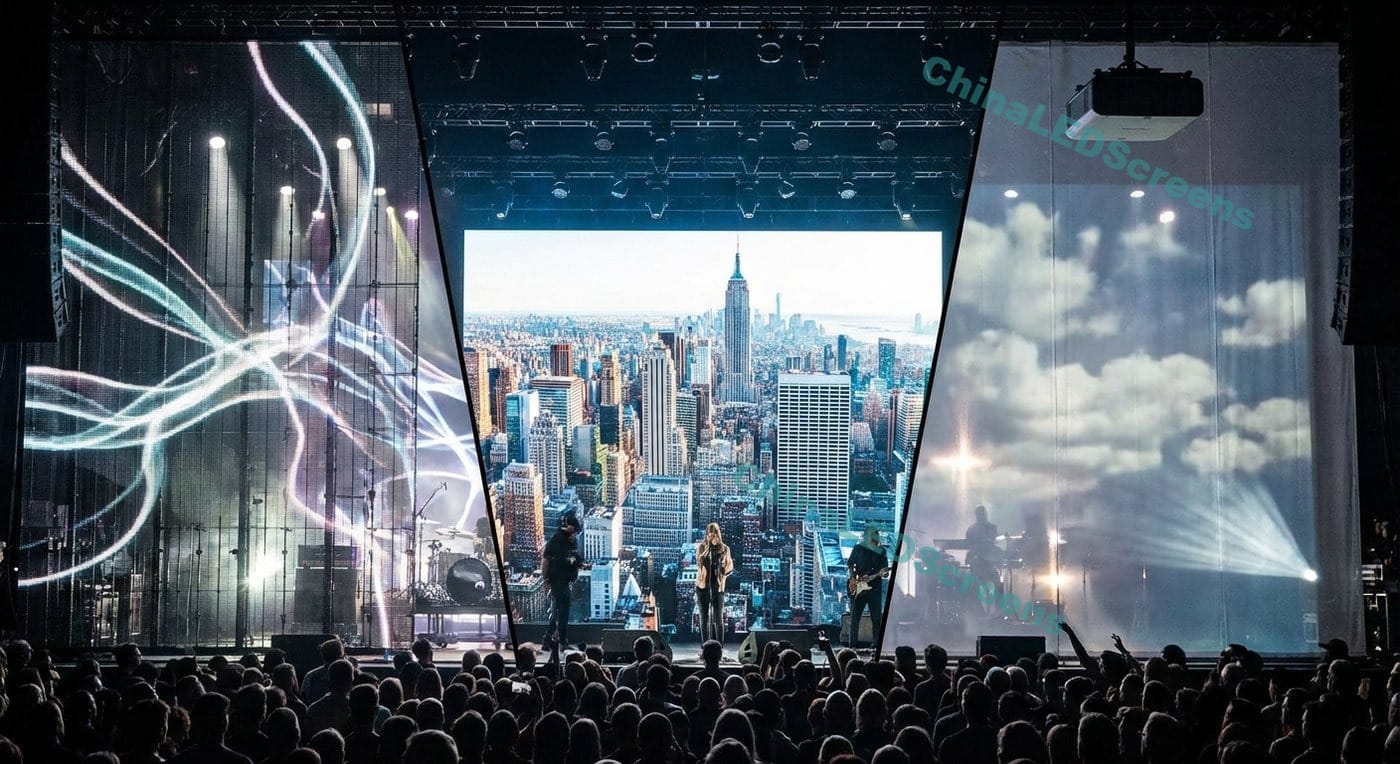
Mesh LED curtain vs solid LED wall vs scrim/projection
Solid LED walls win when you need close viewing, maximum resolution, and the strongest contrast (especially indoors). Projection/scrim wins when you want ultra-light scenic texture and you have controlled ambient light. Mesh LED curtains sit in the sweet spot for large stages: enough brightness and video performance, but lighter and more breathable than solid walls.
Quick selection rules (the “2-minute spec”)
If you only remember one section, make it this one.
1) Pick pixel pitch by viewing distance (stage rule-of-thumb)
For stage backdrops, audiences are usually farther than retail or control-room screens, so you can often choose a larger pitch without sacrificing perceived sharpness.
Practical guide:
- Indoor theatre / closer audience: smaller pitch (tighter image)
- Concerts / arenas / festivals: larger pitch is often acceptable and more cost-efficient
A simple way to frame it: the bigger the venue and the longer the viewing distance, the less you gain from ultra-fine pitch—while weight, wind, and speed of deployment become more important.
2) Brightness: indoor vs outdoor targets
Brightness is where many stage projects get over- or under-specified.
- Indoor stage backdrops: commonly around 800–1,200 nits (because lighting is controlled)
- Outdoor concerts/festivals: often 5,000–8,000+ nits to stay readable under daylight conditions
Pro tip: “More nits” isn’t always better. Over-bright screens can wash out cameras, overpower stage lighting, and look harsh. You want a screen that can reach the target, then you run it at the right operating level.
If your project includes outdoor shows, start from Outdoor Mesh LED Display (Waterproof) and work backward from conditions.
3) Camera-ready: refresh rate + scan + processing
If the backdrop will be filmed, streamed, or used for IMAG, camera performance is not optional.
A common recommendation is ≥3,840 Hz refresh rate for “on-camera” use to reduce flicker/scan artifacts.
Also, don’t treat “refresh rate” as the only number that matters. Scan behavior and processing settings affect what cameras see. (In practice: choose reputable processing, then validate with a real camera test.)
4) Transparency and contrast (the real visual trade-off)
Mesh looks amazing when:
- your content is bold, high-contrast, and designed for large-format viewing
- lighting can create depth behind/through the mesh
- you have some control of ambient light (or sufficient brightness outdoors)
Mesh can disappoint when:
- you expect “solid-wall black levels”
- the background behind the mesh is bright or visually messy
- you use detailed content that requires tight pixel density
Engineering basics you can’t ignore
Rigging & structure loads (what actually limits your design)
Your LED backdrop isn’t just a display—it’s a rigging load. Plan for:
- Hanging points / pick points on truss
- Safety factors (secondary safeties, proper hardware)
- Dynamic forces (wind outdoors; movement during install)
- Build time constraints (touring schedules)
Mesh helps because it’s often lighter and more wind-friendly than solid LED surfaces, which can reduce structural demands.
Cable routing, service access, and touring workflow
Ask these before you buy:
- Can technicians swap a module from the front or rear?
- How are power + data daisy-chained (and what’s the failure mode)?
- Are connectors robust for touring (strain relief, quick-lock, protected pins)?
- How do you pack it (flight cases, carts, touring frames)?
Touring ecosystems obsess over transport + speed for a reason: the best display is the one that builds on time, every time.
If your use case is explicitly events/touring, browse LED Displays for Events, Broadcast & Rental and spec from that lens.
Power, heat, and redundancy planning
For stage backdrops, “it turns on” isn’t enough—you need predictable operation.
Minimum planning items:
- power distro plan (separate circuits, headroom, safe routing)
- signal topology (primary + backup if required)
- spare strategy (modules, PSUs, receiving cards depending on design)
Mesh often dissipates heat more easily than solid cabinets (more airflow), but outdoor designs still need robust weather protection.
Weatherproofing & wind for outdoor stages
Outdoor stage backdrops face:
- rain ingress risk (connectors, seams, cable points)
- dust and humidity
- wind gusts and pressure differentials
Outdoor solutions frequently target higher brightness ranges (5,000–8,000+ nits) and appropriate protection levels.
Content & show control workflow (what makes it look expensive)
Processor vs media server: who does what?
- LED processor/controller: handles input formats, scaling, calibration, and output to the screen.
- Media server: generates and plays content, handles complex mapping, timecode, and show control.
For a clean result, decide early:
- who owns content playback (LD, video team, media server op)
- resolution and aspect ratio targets
- whether the wall is IMAG background, scenic texture, or both
Pixel mapping for creative shapes
One reason producers love mesh curtains: you can do non-rectangular scenic looks without needing a full rectangular solid wall.
If you anticipate creative shapes, plan:
- how you will map content to the physical geometry
- how much “dead area” you can tolerate
- whether you need multiple hang sections with separate mapping
Color calibration and brightness management
A stage backdrop often sits next to:
- moving lights
- haze
- scenic elements
- cameras with changing exposure
Calibrated color and controlled brightness curves keep the wall from looking like a “giant phone screen” and instead make it feel integrated into the show.
Common problems (and fixes)
Problem 1: Flicker / scan lines on camera
What it looks like: rolling bars, shimmering, exposure-related artifacts. Fix direction: choose camera-ready hardware and validate settings.
A widely cited guideline for filming is using high refresh rate (often ≥3,840 Hz) to reduce flicker and improve camera results.
Practical steps in the field:
- test with the actual camera(s) used in production
- check shutter speed/angle settings
- use the processor’s camera/broadcast modes when available
Problem 2: Moiré patterns
What it looks like: waves/rainbows/false patterns that aren’t in the content. Moiré is an interference effect between the LED pixel grid and the camera sensor sampling. It often improves by changing geometry—camera angle, distance, and focus plane choices.
Field tactics:
- slightly change camera angle or position
- increase subject-to-wall distance (separate focus planes)
- choose a pixel pitch appropriate for the camera distance
Problem 3: Low contrast in bright environments
Symptoms: blacks look gray; content feels washed out outdoors. Fix levers:
- higher brightness capability (then manage output)
- better contrast design (black face LEDs, content design)
- consider where the sun/ambient light hits the wall
Problem 4: “It worked yesterday, now a section is dark”
Most often: a power path, connector, or a single component failure in a chain topology. Fix direction:
- define redundancy expectations in the RFQ
- carry spares appropriate to the product architecture
- use clear labeling and disciplined cable management
RFQ template + procurement checklist (copy/paste)
Use this to prevent 80% of “surprise problems”:
Must-ask RFQ questions (10 items)
- Application: indoor / outdoor / mixed, and whether it’s filmed/streamed
- Total size: width × height, and whether it’s one piece or segmented hangs
- Pixel pitch options: recommended pitch for our viewing distance
- Brightness: target nits and how brightness is controlled (dimming curve)
- Camera performance: refresh rate, scan behavior, and processor recommendations
- Transparency: percentage/open-area concept and expected visual trade-offs
- Rigging method: hanging hardware, frame type, connection method, safety points
- Serviceability: front/rear service, module swap time, tool requirements
- Power & signal: max/avg power, data topology, redundancy options
- Outdoor protection: IP rating, connector protection, wind and weather notes
Acceptance test plan (what pros actually do)
- Burn-in before show deployment
- Camera test with final shutter settings (and bright + dark content)
- Uniformity check (color/brightness consistency)
- Outdoor simulation if applicable (spray test, connector inspection)
Where to see solutions and examples (internal)
- Start with the category overview: Mesh LED Displays
- Deep dive buyer guide: Mesh LED Displays: Flexible Mesh Curtain Display Guide
- Outdoor spec direction: Outdoor Waterproof Mesh LED Display
- Events/touring context: LED Displays for Events, Broadcast & Rental
- Project inspiration: Projects & Case Studies
FAQ
Can LED mesh curtains be used outdoors?
Yes—if the product is designed for outdoor weatherproofing and you’ve planned for wind, rigging, and brightness. Outdoor brightness often sits in the 5,000–8,000+ nit range depending on conditions.
What refresh rate do I need for filming?
A common guideline is high refresh rate (often ≥3,840 Hz) to reduce flicker and scan artifacts on camera. Always validate with a real camera test.
How do I reduce moiré on camera?
Change geometry first: camera angle, distance, and focus plane choices often reduce moiré significantly, and pixel pitch choice matters.
How many spare parts should I buy?
For touring: plan spares as a percentage of the deployment (modules + key electronics) and align with your show risk tolerance. If one dead module is acceptable in a festival context, you can carry fewer spares than a broadcast set.